
Mapping FredMaster (aka Brox) Android Banking Trojan: Infrastructure & Defense
FredMaster, also tracked as Brox, is a modular Android banking trojan family that harvests credentials and performs fraudulent transactions through overlay attacks, accessibility abuse and SMS interception.

Infrastructure & Technical Analysis (expanded)
Observed indicator
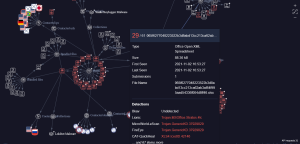
SHA256: ce0f20f0c1283fd0e29a5b6a4bd2a44c6a1968b0e7553386bf1e7c88ffce5427
(This IOC has been observed in campaigns showing overlaps with Loki and ICEID clusters, prioritize correlation across telemetry.)
Summary
FredMaster/Brox is a modular Android banking trojan family that aims to harvest credentials and perform fraudulent transactions via overlay attacks, accessibility abuse, SMS interception and persistent implants. Threat operators commonly build a multi-stage infrastructure (delivery → persistence → C2 → monetization) and often reuse or interlink components with other crimeware such as Loki and ICEID for credential resale and broader fraud operations.
Technical architecture (non-actionable, defender-focused)
1. Delivery & initial execution
Vectors observed (defensive framing): repackaged legitimate apps, sideloaded APKs on third‑party stores, malicious update prompts, phishing SMS (smishing).
Artifacts to capture: original APK file; package name; signing certificate fingerprint; installer source (Play Store vs unknown).
2. Components & modules
Core APK / loader: unpacks modules, checks environment, persists.
Overlay module: shows fake login screens over banking apps to capture credentials.
Accessibility module: abuses AccessibilityService to read UI, auto‑click, and bypass 2FA prompts.
SMS / Telephony hooks: intercepts OTPs or hides transaction alerts.
Native libraries (optional): for stealth/privilege escalation or to interact with low‑level APIs.
Update/C2 module: retrieves additional payloads, configuration, or commands.
Defensive note: these modules are typically present as distinct dex classes, services, or native libs inside the APK, hunt for unexpected services and permission sets.
3. Persistence & stealth
Abuses Android APIs (device admin, accessibility, background services, alarm managers) and may obfuscate code and strings to evade static detection.
May use well‑known obfuscation/packing tools, look for large encrypted blobs, dex loaders, or classes that perform reflective calls.
4. Command & Control (C2)
Encrypted channels (HTTPS or custom) to remote endpoints; C2 may use fast‑flux domains, CDNs, or bulletproof hosts.
Operators often correlate infrastructure with other malware families (e.g., Loki, ICEID) to monetize credentials or for lateral spam/fraud operations.
5. Monetization & post‑compromise
Credential theft, account takeover, automated transfers, resale of stolen credentials on fraud forums, or integration with botnets run by other actors.
Forensics & indicators of compromise (defensive)
Key artifacts to collect
Ingest the provided SHA256 into your IOC store and search logs/endpoint stores for matches.
APK filename, package name, signing certificate fingerprint (SHA1/MD5), and embedded domains/IPs.
Suspicious Android permissions (e.g., SYSTEM_ALERT_WINDOW, RECEIVE_SMS, READ_SMS, WRITE_SMS, BIND_ACCESSIBILITY_SERVICE, REQUEST_INSTALL_PACKAGES).
Running processes/services on device, installed apps list, and battery/CPU anomalies (indicators of background activity).
Filesystem artifacts
Unusual files in app data dirs (/data/data/<package>/), dex files extracted at runtime, or native .so files stored in app directories.
Network indicators
Repeated POSTs to uncommon hostnames or IPs, anomalous TLS fingerprints, unexpected SNI strings, or large base64‑encoded blobs in HTTP bodies.
Connections to domains/IPs previously associated with Loki/ICEID should be treated as higher priority.
Detection guidance (examples defenders can use)
Static detections (non-actionable)
Flag APKs requesting multiple high‑risk permissions (SMS + Accessibility + overlay) whose package name or certificate do not match expected vendor values.
Look for embedded strings in APKs such as common overlay keywords, suspicious API reflection usage, or encrypted blobs.
Dynamic detections / telemetry to monitor
New app installs from unknown sources (logs from MDM or EMM).
Accessibility service enablement events on devices that don’t require accessibility for normal operations.
Unexpected SMS send/receive behavior originating from non‑system apps.
High‑frequency HTTP POSTs with small interval timing to external hosts from mobile devices.
Example SOC hunting queries (generic; adapt to your platform)
Splunk (example), search for accessibility enable events
“<br />index=mobile_logs event=”accessibility_enabled” AND app_package!=”com.android” | stats count by device_id, app_package, user<br />“
Elastic / Kibana, new app installs from unknown source
“<br />event.type: “app_install” AND install_source: (“unknown” OR “untrusted_store”) AND NOT app_package.keyword:”com.google.play”<br />“
Network, suspicious POSTs (pseudo‑query)
“<br />network.http.method: “POST” AND network.http.response_code: 200 AND network.bytes_out > 1000 AND <br />NOT dns.domain: (“trustedcdn.com” OR “googleapis.com”)<br />“
Sample defensive YARA‑style signatures (illustrative, non‑executable)
These are high‑level patterns to inspire your static rules, tune to your environment and avoid false positives.
rule Android_Suspicious_Overlay_Perms {
strings:
$s1 = "SYSTEM_ALERT_WINDOW"
$s2 = "BIND_ACCESSIBILITY_SERVICE"
$s3 = "RECEIVE_SMS"
condition:
any of ($s)
}
(Use such patterns only as a starting point; validate against known good apps to reduce false positives.)
Incident response playbook (short, prioritized)
1. Contain
Isolate affected devices (MDM→quarantine), block associated network endpoints and domains at the gateway.
2. Collect
Preserve APK bin, device logs, SMS logs, network captures, and installed apps manifest/signature. Ingest SHA256 into your IOC platform.
3. Analyze
Static APK analysis (manifest, permissions, signing cert), dynamic sandboxing in an isolated environment, and network correlation with known Loki/ICEID infrastructure.
4. Eradicate
Remove malicious app, revoke device admin/accessibility permissions, rotate credentials for affected accounts, enforce MFA resets.
5. Recover & Hardening
Reinstall from trusted sources, update OS, enforce app install policies, and deploy mobile threat defense / EDR on mobile devices.
6. Post‑incident
Threat hunt for lateral activity, check for credential reuse, and update detection rules and playbooks.
Recommended preventative controls
- Enforce app‑install policies (allow only Play Store / enterprise signed apps).
- Block installation from unknown sources via MDM/EMM.
- Enforce device encryption, strong lock screens and regular OS updates.
- Require multi‑factor authentication and out‑of‑band transaction verification for banking/finance actions.
- Monitor and alert on accessibility service changes and new device admin enrollments.
How we help
We provide an end‑to‑end service: ingest and enrich IOCs (like the SHA256 above), map attacker infrastructure, cluster related C2s (including ties to Loki/ICEID), and deliver prioritized detection content (network rules, static signatures), a tailored incident playbook, and managed threat hunting. We also produce a concise infrastructure map your SOC can operationalize.
Request a tailored infrastructure map & technical remediation